
Qwen3-TTS: Alibaba's Open-Source Text-to-Speech System
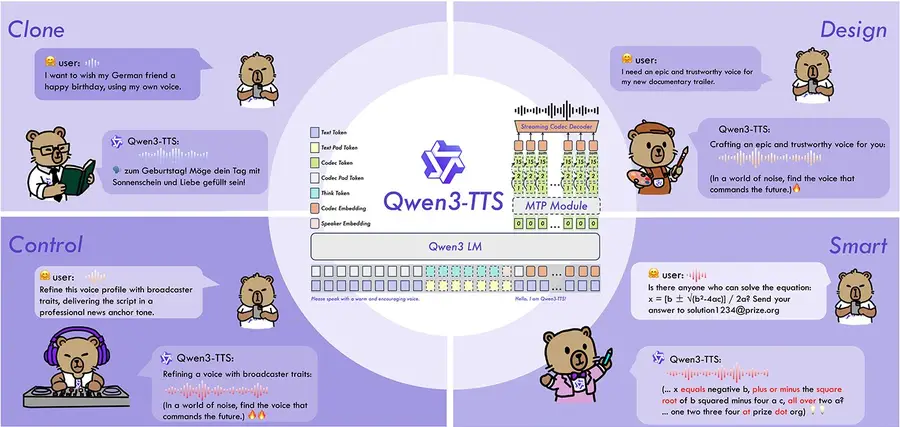
Qwen3-TTS is Alibaba Cloud's open-source text-to-speech system, released in late November 2025 and updated through January 2026. It goes far beyond simple voice synthesis — offering three distinct modes: voice cloning from just 3 seconds of audio, voice design that creates entirely new voices from text descriptions, and custom voice with 9 pre-built speakers and full emotional control. The system supports 10 languages, runs locally on consumer GPUs with as little as 4 GB of VRAM, and is released under the Apache 2.0 license.
What makes Qwen3-TTS stand out in a crowded TTS landscape isn't any single feature — it's the combination of all three generation modes in one open-source family, with quality that community testers consistently describe as competitive with or exceeding commercial services like ElevenLabs. The multi-codebook tokenizer preserves acoustic details that other models lose (laughs, sighs, breathing patterns), and the dual-track architecture achieves a 97ms first-packet latency for real-time applications. For an overview of the broader ecosystem, see the Qwen 3 family page.
In This Guide
Model Variants
The Qwen3-TTS family consists of multiple specialized models across two sizes:
| Model | Parameters | Mode | VRAM |
|---|---|---|---|
| Qwen3-TTS-12Hz-1.7B (Base) | 1.7 billion | Voice cloning | ~5–6 GB |
| Qwen3-TTS-12Hz-1.7B-CustomVoice | 1.7 billion | 9 pre-built voices + emotion control | ~5–6 GB |
| Qwen3-TTS-12Hz-1.7B-VoiceDesign | 1.7 billion | Create voices from text prompts | ~5–6 GB |
| Qwen3-TTS-12Hz-0.6B (Base) | 0.6 billion | Voice cloning (lighter) | ~3.5–4 GB |
| Qwen3-TTS-12Hz-0.6B-CustomVoice | 0.6 billion | Pre-built voices (lighter) | ~3.5–4 GB |
All models are released under Apache 2.0. The 1.7B variants produce noticeably better quality and expressiveness, while the 0.6B variants are ideal for speed-sensitive applications or limited hardware. The base model files are under 4 GB for the 1.7B and under 2 GB for the 0.6B, making them very accessible.
The Three Modes of Qwen3-TTS
Unlike most TTS systems that offer a single generation approach, Qwen3-TTS provides three fundamentally different ways to generate speech:
1. Voice Cloning (Base Model)
Clone any voice with as little as 3 seconds of reference audio. The model extracts the speaker's timbre, cadence, and acoustic characteristics, then generates new speech in that voice. Community testers report that even 3 seconds can produce recognizable clones, though longer reference clips (8–15 seconds) significantly improve quality.
- Zero-shot — No training required. Upload audio, type text, generate.
- Cross-lingual — Clone a voice speaking Spanish and make it speak English, Japanese, or any of the 10 supported languages while preserving the original timbre.
- X-Vector mode — If you don't want to transcribe the reference audio, enable "X-Vector Only" to extract the voice identity from the audio alone (slightly lower quality than providing the transcript).
2. Custom Voice (Pre-built Speakers + Emotion)
Choose from 9 pre-built high-quality voices and control how they speak through text instructions. You can make a voice sound sad, angry, whispering, excited, sarcastic, or any other emotional tone.
| Voice | Native Language | Description |
|---|---|---|
| Aiden | English | Male, clear and versatile |
| Ryan | English | Male, warm and natural |
| Vivien | Chinese | Female, bright and slightly edgy |
| Soji | Japanese | Male, calm and measured |
| Dylan | Korean | Male, articulate |
| + 4 additional voices for Chinese dialects | ||
All voices work across all 10 languages, though they perform best in their native language. Using a Chinese-native voice for English text produces a natural accent effect that can be useful for specific applications.
3. Voice Design (Text-to-Voice)
This is the most innovative feature — and one that's rarely seen in TTS systems. You can create an entirely new voice from scratch using only a text description. No reference audio needed at all.
You describe the voice you want — gender, age, accent, personality, speaking pace, emotional baseline — and the model generates a voice matching that description. Examples tested by the community include:
- "Very old man, raspy and weak voice" — produces an elderly, trembling voice
- "Sassy, flirty female in her 20s, dynamic expressive vocal range" — produces an animated, youthful voice
- "Middle-aged adult, authoritative, confident and performative" — produces a broadcast-quality voice
- "Cute cartoon chipmunk voice" — produces a high-pitched animated character voice
The Qwen team provides detailed prompting templates that let you specify gender, pitch, speed, accent, age, background personality, and gradual control over how the voice evolves throughout the text.
Multi-Speaker Podcast Generation
A unique capability: you can define multiple speakers in a single prompt and have them converse naturally. For example, define "Lucas" (male) and "Mia" (female) with distinct personality traits, then write a dialogue transcript. Qwen3-TTS generates the full conversation with voice-switching, making it possible to create podcast-style audio from a single generation.
Architecture: Dual-Track Multi-Codebook
Qwen3-TTS introduces two key architectural innovations that set it apart from traditional TTS systems:
Multi-Codebook Tokenizer (12Hz)
Traditional audio codecs compress audio into a single stream, losing fine details like breathing patterns, laughter, and acoustic environment. Qwen3-TTS uses a multi-codebook tokenizer that maintains multiple parallel representations of the same audio. This preserves both high-level semantic information and fine acoustic details simultaneously.
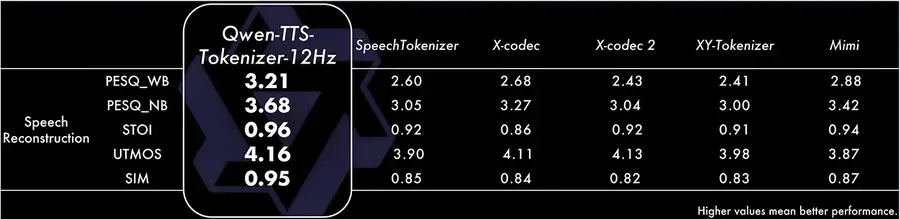
The results speak for themselves: the tokenizer achieves a PESQ score of 3.21 (wideband, broadcast-quality), an STOI of 0.96 (near-perfect intelligibility), and a speaker similarity (SIM) of 0.95 — meaning almost zero identity loss during synthesis.
Dual-Track Architecture
Traditional TTS uses two stages: a language model to predict tokens, then a diffusion model to generate audio. Qwen3-TTS replaces this with a dual-track architecture using discrete multi-codebook modeling that processes multiple streams in parallel. The practical benefits:
- Bidirectional streaming — The model can begin generating audio after processing just a single character of text.
- 97ms first-packet latency — From text input to the first audible output in under 100 milliseconds, enabling real-time conversational applications.
- No diffusion bottleneck — The single-pass architecture avoids the latency penalties of diffusion-based decoders.
Benchmarks & Performance
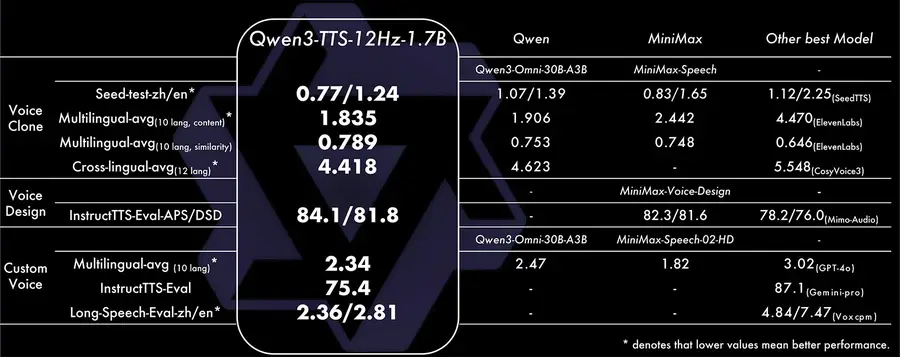
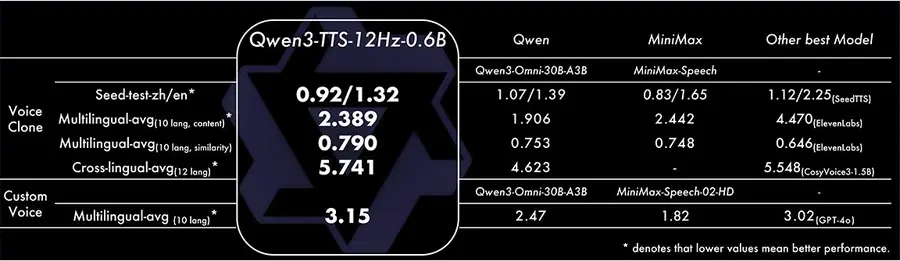
Qwen3-TTS-1.7B achieves competitive or leading results across voice cloning, voice design, and custom voice benchmarks:
Key Benchmark Highlights
| Category | Metric | Qwen3-TTS-1.7B | Best Competitor |
|---|---|---|---|
| Voice Clone (Seed-test zh/en) | WER (lower=better) | 0.77 / 1.24 | 0.83 / 1.65 (MiniMax) |
| Voice Clone (Multilingual) | Content accuracy | 1.835 | 1.906 (Qwen3-Omni) |
| Voice Clone (Cross-lingual) | Quality score | 4.418 | 4.623 (Qwen3-Omni) |
| Voice Design | APS / DSD (higher=better) | 84.1 / 81.8 | 82.3 / 81.6 (MiniMax) |
| Custom Voice (Instruction) | Eval score (higher=better) | 75.4 | 87.1 (Gemini-pro) |
| Speaker Similarity | SIM (higher=better) | 0.95 | — |
Qwen3-TTS leads in voice cloning accuracy and voice design quality. On instruction-following for custom voices, commercial models like Gemini-pro still hold an edge, but the gap is narrowing rapidly — and Qwen3-TTS is the only fully open-source option competing at this level.
Supported Languages
Qwen3-TTS supports 10 major languages:
The model handles cross-lingual generation well — you can clone a voice that speaks Spanish and have it output English while maintaining the original timbre and character. Community testers have also noted that accented voices transfer naturally across languages, producing authentic-sounding accented speech.
How to Run Qwen3-TTS Locally
There are multiple ways to run Qwen3-TTS depending on your technical level:
Option 1: Official Web UI (Python)
The most direct approach using the official repository.
- Clone the repository:
git clone https://github.com/QwenLM/Qwen3-TTS
cd Qwen3-TTS
pip install -r requirements.txt - Download models from Hugging Face:
huggingface-cli download Qwen/Qwen3-TTS-12Hz-1.7B - Launch the demo for each mode:
# Voice cloning (base model)
python qwen-tts-demo.py --model Qwen3-TTS-12Hz-1.7B --port 8000

# Custom voice
python qwen-tts-demo.py --model Qwen3-TTS-12Hz-1.7B-CustomVoice --port 8001

# Voice design
python qwen-tts-demo.py --model Qwen3-TTS-12Hz-1.7B-VoiceDesign --port 8002
Option 2: ComfyUI (Graphical Interface)
The easiest option for users who prefer a visual, node-based workflow. Requires ComfyUI installed.
- Navigate to
ComfyUI/custom_nodes/and clone the Qwen TTS workflow repository. - Install requirements from the new folder.
- Restart ComfyUI and find the Qwen3-TTS template under Templates.
- Models download automatically on first run (~6 GB total).
The ComfyUI workflow provides separate nodes for voice cloning, custom voice, and voice design — all accessible in a single interface. Generation takes approximately 15–20 seconds for a typical sentence on consumer hardware.
Option 3: Google Colab (Free, No GPU Required)
If you don't have a dedicated GPU, you can run Qwen3-TTS for free using Google Colab with a T4 GPU.
- Open the community-provided Colab notebook (linked from the Qwen3-TTS repository).
- Select GPU runtime (T4 is free).
- Run the installation cells and start generating.
Inference takes slightly longer on Colab (~25 seconds per sentence with the 1.7B model) but it's completely free and requires zero local setup.
Hardware Requirements
| Model | Model Size | VRAM (Inference) | Speed (Typical Sentence) |
|---|---|---|---|
| 1.7B variants | ~4 GB | ~5–6 GB | ~15–20 seconds |
| 0.6B variants | ~2 GB | ~3.5–4 GB | ~10–15 seconds |
The models are remarkably lightweight. The 0.6B variant can run on virtually any modern GPU (even a GTX 1660 with 6 GB VRAM), while the 1.7B variant fits comfortably on cards like the RTX 3060 or higher. Generation speed depends on text length and hardware, but typical sentences complete in 10–20 seconds on consumer GPUs.
For general guidance on running Qwen models locally, see our local deployment guide and hardware requirements page.
Fine-Tuning Qwen3-TTS
Qwen3-TTS supports single-speaker fine-tuning to create a highly personalized voice model. This is useful when zero-shot cloning doesn't capture enough detail, or when you need consistent voice output across many generations.
What You Need
- Audio samples — A collection of recordings from a single speaker (the more diverse the better).
- GPU — At least 12 GB VRAM for the 1.7B model (or a 3060 for the 0.6B model). Training uses approximately 30 GB VRAM at batch size 8.
- Transcription tool — WhisperX or a similar tool to transcribe your audio samples into training data.
Process Overview
- Prepare your dataset — Use a dataset maker tool to transcribe audio files, slice them into segments (recommended: under 20 seconds each), and export in Qwen3-TTS format.
- Download the tokenizer — The Qwen3-TTS tokenizer is required separately for fine-tuning.
- Configure training — Set batch size (lower for less VRAM), number of epochs (10+ recommended), and learning rate.
- Train — Run the training script. Checkpoints are saved at configurable intervals.
- Test — Launch the demo with your trained checkpoint to evaluate quality.
Important Tips from the Community
- Speaker naming bug — Do NOT name your speaker with numbers (e.g., "Speaker 1"). Use alphabetic names only — numeric names cause inference errors.
- Batch size matters — If you're running out of VRAM during training, reduce batch size to 1–2 instead of the default 8.
- Reference audio quality — Use a clean, representative 4–10 second clip as your reference audio for the training configuration. This clip influences the baseline voice during inference.
Qwen3-TTS vs. Commercial Alternatives
| Feature | Qwen3-TTS | ElevenLabs | GPT-4o Audio |
|---|---|---|---|
| Open-source | Yes (Apache 2.0) | No | No |
| Cost | Free (self-hosted) | $5–$99/month | Pay per token |
| Voice cloning | 3-second zero-shot | Yes | No |
| Voice design (text-to-voice) | Yes (unique feature) | No | No |
| Emotion control | Text-based prompting | Style presets | Limited |
| Languages | 10 | 29+ | 50+ |
| Offline/local | Yes | No | No |
| Fine-tuning | Yes (single speaker) | No | No |
| Multi-speaker podcast | Yes (single generation) | Limited | No |
| Min VRAM | ~4 GB (0.6B model) | N/A (cloud) | N/A (cloud) |
ElevenLabs still leads in language count and has a more polished API, but Qwen3-TTS offers something commercial services cannot: full local control, zero recurring costs, fine-tuning capability, and the unique voice design mode. For developers and content creators who need flexibility and privacy, Qwen3-TTS is a compelling alternative. For comparisons of Qwen models in other domains, see our Qwen vs. ChatGPT page.
Final Verdict
Qwen3-TTS is arguably the most feature-complete open-source TTS system available today. The combination of voice cloning, voice design, and emotionally-controlled custom voices in a single family — all running on consumer hardware — is unprecedented. The quality consistently impresses testers, with the voice design capability being genuinely novel.
It's not perfect: language support is limited to 10 languages (ElevenLabs offers 29+), instruction-following for emotions can be inconsistent on the 0.6B model, and the voice design mode requires experimentation with prompts to get optimal results. But these are minor caveats for a system that is free, open-source, and runs locally.
For content creators looking to generate multilingual voiceovers, developers building voice-enabled applications, or anyone who wants unlimited TTS without monthly subscriptions — Qwen3-TTS delivers serious value.
For the companion speech recognition models, see our Qwen3-ASR guide. Explore the full Qwen 3 family, try Qwen AI Chat, or check our guide to running Qwen models locally.