
Run Qwen with Ollama
Ollama is the fastest way to get Qwen running on your machine. One command pulls the model, quantizes it, and starts serving — no Python environment, no manual GGUF downloads, no config files. For text generation with Qwen 3.5 or any Qwen model, it genuinely takes under 60 seconds from install to first output.
That said, Ollama's Qwen support has real problems right now. Tool calling is broken. Vision models don't work for Qwen 3.5. Speed sits at roughly 15-20% of what llama.cpp delivers on the same hardware. If any of those matter to you, read the known issues section before committing — it's the most important part of this guide.
Quick verdict: If you want the simplest possible setup for text-only Qwen inference and don't need tool calling or vision, Ollama is the right choice. For production workloads, maximum speed, or Apple Silicon optimization, look at llama.cpp or MLX on Mac instead.
In This Guide
Install Ollama on Any Platform
Ollama runs on macOS, Linux, and Windows. Pick your platform and you'll be ready in under a minute.
macOS
brew install ollamaIf you don't use Homebrew, grab the installer from ollama.com/download. Both Intel and Apple Silicon are supported natively.
Linux
curl -fsSL https://ollama.com/install.sh | shThis installs the binary and sets up a systemd service. Works on Ubuntu, Debian, Fedora, Arch, and most mainstream distros. NVIDIA and AMD GPUs are auto-detected.
Windows
winget install Ollama.OllamaOr download the MSI installer from ollama.com/download. Windows ARM64 has a native build as of 2026, so Surface Pro and Snapdragon laptops work without emulation.
Verify the Installation
Start the server and confirm everything works:
ollama serve
ollama list
If ollama list returns an empty table without errors, you're good. Now pull a model.
Available Qwen Models in Ollama
Ollama hosts official GGUF quants for most Qwen models. Every command below pulls the model and starts inference immediately — no extra steps. Not sure which size fits your GPU? Check our Can I Run Qwen? tool before downloading.
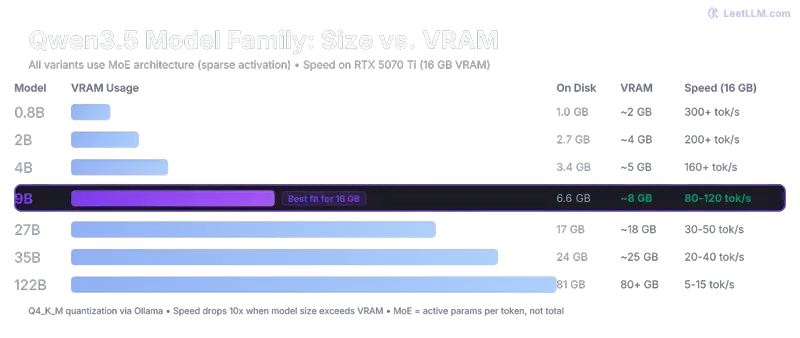
Qwen 3.5 — Small Models (0.8B to 9B)
These are the models most people should start with. The 9B is the sweet spot — it fits comfortably in 8GB VRAM and punches well above its weight on reasoning tasks.
| Model | Parameters | VRAM (approx) | Command |
|---|---|---|---|
| qwen3.5:0.8b | 0.8B | ~1 GB | ollama run qwen3.5:0.8b |
| qwen3.5:2b | 2B | ~2 GB | ollama run qwen3.5:2b |
| qwen3.5:5b | 5B | ~4 GB | ollama run qwen3.5:5b |
| qwen3.5:9b | 9B | ~6-7 GB | ollama run qwen3.5:9b |
Qwen 3.5 — Large Models (35B and 122B)
The 35B-A3B is a MoE (Mixture of Experts) model — 35 billion total parameters, but only 3 billion active per token. That means it runs surprisingly fast on consumer hardware. The 122B needs serious GPU memory or multi-GPU setups.
| Model | Architecture | VRAM (approx) | Command |
|---|---|---|---|
| qwen3.5:35b-a3b | MoE — 3B active | ~20-22 GB | ollama run qwen3.5:35b-a3b |
| qwen3.5:122b | Dense | ~70-80 GB | ollama run qwen3.5:122b |
Heads up: Early Ollama releases couldn't load the 35B MoE at all — the architecture wasn't supported in standard loaders. This has been fixed in recent versions, but if you hit errors, make sure you're on Ollama v0.17.5 or later.
Qwen 3 Models (Previous Generation)
Qwen 3 models are still solid and sometimes more stable in Ollama than the newer 3.5 family. If you need reliable tool calling or just want fewer rough edges, these are worth considering.
| Model | Parameters | VRAM (approx) | Command |
|---|---|---|---|
| qwen3:0.6b | 0.6B | ~1 GB | ollama run qwen3:0.6b |
| qwen3:1.7b | 1.7B | ~1.5 GB | ollama run qwen3:1.7b |
| qwen3:4b | 4B | ~3 GB | ollama run qwen3:4b |
| qwen3:8b | 8B | ~5-6 GB | ollama run qwen3:8b |
| qwen3:14b | 14B | ~10 GB | ollama run qwen3:14b |
| qwen3:32b | 32B | ~20 GB | ollama run qwen3:32b |
Specialized Models
| Model | Type | Command |
|---|---|---|
| qwen3-coder-next | Code generation | ollama run qwen3-coder-next |
| qwen2.5-coder | Code generation (stable) | ollama run qwen2.5-coder |
| qwen3-vl:8b | Vision + Language | ollama run qwen3-vl:8b |
For coding tasks, see our Qwen Coder guide — it covers which coder variant to pick and how to connect it to your IDE. The vision model (qwen3-vl) is the only way to do image understanding through Ollama right now, since Qwen 3.5 vision isn't supported yet.
Known Issues with Qwen on Ollama (Read This First)
This is the section no other site writes. Ollama's Qwen support works for basic text generation, but there are six active issues that range from annoying to deal-breaking depending on your use case. All of these are documented on GitHub with open issue threads.
1. Speed: 5-7x Slower Than llama.cpp
This is the biggest practical gap. On identical hardware with the same model and quantization, Ollama delivers roughly 15-20 tokens per second where llama.cpp hits 80-100+ tok/s. The difference isn't subtle — it's the difference between usable real-time chat and watching paint dry on longer outputs.
The root cause: Ollama hasn't fully optimized for the hybrid GatedDeltaNet architecture that Qwen 3.5 uses. The 75% linear attention layers that make these models efficient at the architecture level aren't getting the inference speedups they should. This is tracked in Issue #14579.
Workaround: There isn't one inside Ollama. If speed matters, llama.cpp is 2-5x faster on the same hardware right now. On Apple Silicon, MLX is roughly 2x faster than Ollama as well.
2. Tool Calling: Completely Broken for Qwen 3.5
If you're building an agent or any workflow that relies on function calling, stop here. Tool calling with Qwen 3.5 in Ollama is non-functional — and it's not one bug, it's three stacked on top of each other:
- Unclosed XML tags in the tool response format, causing parsers to choke
- Missing generation prompt, so the model doesn't know when to produce tool calls
- Penalty sampling not implemented for the Qwen 3.5 template, leading to garbage outputs
All three are tracked in Issue #14493. Until this is resolved, Qwen 3 models handle tool calling better in Ollama, or you can switch to llama.cpp where tool calling works correctly.
3. Vision: No Qwen 3.5 Support
Qwen 3.5 includes vision-capable models, but Ollama can't run them. The mmproj (multimodal projector) format is incompatible, so pulling a Qwen 3.5 vision variant simply fails.
Workaround: Use qwen3-vl:8b instead — it's the older Qwen 3 vision model, and it works fine in Ollama. You'll miss the 3.5 quality improvements, but at least image understanding is functional. For Qwen 3.5 vision specifically, llama.cpp has working support.
4. Out-of-Memory Crashes
Several users report sudden OOM kills, especially with larger models or long contexts. This is tracked in Issue #14557 and mostly affects versions before 0.17.5.
Fix: Update to Ollama v0.17.5 or later, and set these environment variables before launching:
export OLLAMA_FLASH_ATTENTION=1
export OLLAMA_KV_CACHE_TYPE=q8_0
Flash attention reduces peak memory by processing attention in chunks. The quantized KV cache (q8_0) cuts context memory roughly in half compared to the default FP16 cache. Together, they should eliminate most OOM crashes on cards with 8GB+ VRAM.
5. Thinking Mode Forced ON (800+ Invisible Tokens)
This one is sneaky. Ollama forces thinking mode on for all Qwen 3.5 models by default. Every response starts with 800+ invisible <think> tokens that you never see in the output but that add 30-60 seconds of latency to every single reply. Your model isn't slow — it's silently "thinking" before it starts generating visible text.
Workaround: You can control thinking mode in the chat session with /no_think to disable it or /think to re-enable it. In API calls, include a system prompt that explicitly says "Do not use thinking mode" — though results are inconsistent. A Modelfile with PARAMETER think false (if supported in your version) is more reliable.
6. Repetition Penalties Silently Ignored
Setting repeat_penalty, frequency_penalty, or presence_penalty in Ollama has no effect on Qwen 3.5 models. The parameters are accepted without error but silently discarded. This means you can't tune output diversity through the standard sampling knobs.
There's no clean workaround for this one. If you need fine-grained control over repetition behavior, use llama.cpp directly where all sampling parameters work as expected.
Configuration and Tips
Custom Modelfile
A Modelfile lets you lock in your preferred settings so you don't have to pass them every time. Create a file called Modelfile with these contents:
FROM qwen3.5:9b

PARAMETER temperature 0.7
PARAMETER top_k 40
PARAMETER top_p 0.9
PARAMETER num_ctx 8192

SYSTEM """You are a helpful assistant. Respond concisely and accurately."""
Then build and run your custom model:
ollama create my-qwen -f Modelfile
ollama run my-qwen
Adjust num_ctx based on your VRAM. Higher context windows eat more memory — 8192 is safe for 8GB cards, bump to 16384 or 32768 if you have 16-24GB. Going above 32K with Ollama often triggers the OOM issues mentioned above.
Essential Commands
| Command | What It Does |
|---|---|
ollama list |
Show all downloaded models and their sizes |
ollama pull qwen3.5:9b |
Download a model without starting chat |
ollama rm qwen3.5:9b |
Delete a model to free disk space |
ollama cp qwen3.5:9b my-backup |
Clone a model under a new name |
ollama show qwen3.5:9b |
Display model metadata, template, and parameters |
Prevent OOM Crashes
If you're hitting memory limits, set these before starting Ollama:
# Enable flash attention (lower peak memory)
export OLLAMA_FLASH_ATTENTION=1

# Quantize KV cache to 8-bit (halves context memory)
export OLLAMA_KV_CACHE_TYPE=q8_0
On Windows, set these as environment variables through System Settings or in PowerShell with $env:OLLAMA_FLASH_ATTENTION="1".
OpenAI-Compatible API
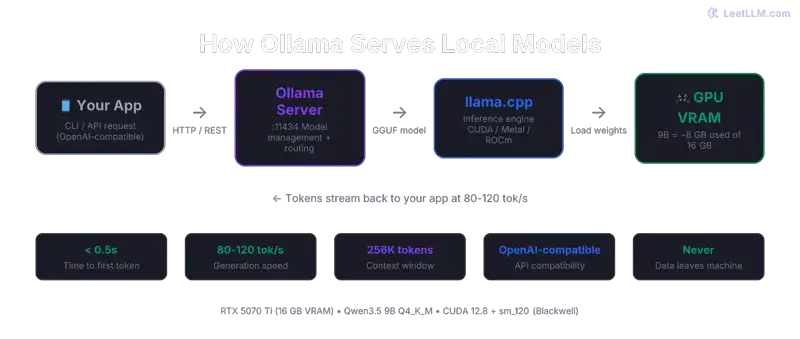
Ollama exposes an API on localhost:11434 that's compatible with the OpenAI client format. This means any tool that supports custom OpenAI endpoints — LM Studio, Open WebUI, SillyTavern, your own scripts — can connect directly:
curl http://localhost:11434/v1/chat/completions \
  -H "Content-Type: application/json" \
  -d '{
    "model": "qwen3.5:9b",
    "messages": [{"role": "user", "content": "Explain transformers in 3 sentences."}]
  }'
No API key needed for local access. The server handles concurrent requests, so you can serve multiple clients or browser tabs simultaneously.
Controlling Thinking Mode
During an interactive chat session, type /no_think to disable the hidden reasoning step and get faster responses. Type /think to re-enable it when you need deeper reasoning on a hard problem. Remember: with thinking enabled, every response burns 800+ tokens you never see, adding 30-60 seconds of latency.
When to Use Ollama vs When to Avoid It
- You want the simplest possible setup — one command, done
- You need an OpenAI-compatible API for local serving
- You're serving multiple users or UIs simultaneously
- Text-only inference is all you need (no vision, no tool calling)
- You're evaluating different Qwen model sizes quickly
- Speed matters — llama.cpp is 2-5x faster on the same hardware
- You need tool calling or function calling (broken for Qwen 3.5)
- You need vision/image understanding with Qwen 3.5
- You're on Apple Silicon — MLX is roughly 2x faster
- You need precise control over sampling parameters
- You're deploying to production with strict latency requirements
The honest summary: Ollama trades performance and feature completeness for convenience. That's a great deal if you're experimenting, prototyping, or just want to chat with Qwen locally. It's a bad deal if your workflow depends on any of the broken features listed above. Check the Ollama GitHub issues periodically — the team is actively working on Qwen support, and several of these problems may be fixed in future releases.
From the Community
Here's what developers running Qwen on Ollama are actually experiencing:
spent yesterday trying to run qwen 3.5 9b locally on my mac mini m4. inference is fast (14 tok/s), tool calling works, ram tight at 6.6gb. one dealbreaker: ollama forces thinking ON for all qwen 3.5 models. 800+ invisible <think> tokens
— witcheer (@witcheer) Date
That 14 tok/s on M4 Mini is real — but the forced thinking mode is exactly the issue we documented above. The invisible tokens silently eat your latency budget without any visible benefit on simple queries.
PSA: Ollama and LM Studio won't load Qwen 3.5-35B-A3B yet, the MoE architecture isn't supported in standard loaders. What works: llama.cpp built from source + Unsloth GGUF quants (Q4_K_XL, 18GB).
— MrE (@MrE_Btc) Date
This was true at launch. Ollama has since added MoE support in newer versions, but the tweet captures something important: Ollama tends to lag behind llama.cpp on new architecture support. If a new Qwen model drops and Ollama can't load it, llama.cpp built from source is usually the first to work.
Frequently Asked Questions
Why is Ollama so much slower than llama.cpp with Qwen models?
Qwen 3.5 uses a hybrid GatedDeltaNet architecture where 75% of layers run linear attention instead of standard quadratic attention. llama.cpp has optimized kernels for this. Ollama, which uses llama.cpp under the hood but adds its own serving layer, hasn't fully optimized for the hybrid path yet. The result is a 2-5x speed penalty. Track progress on Issue #14579.
Can I use Qwen 3.5 vision models in Ollama?
No. The multimodal projector format for Qwen 3.5 vision models isn't compatible with Ollama yet. Your options are: use qwen3-vl:8b (the older Qwen 3 vision model that does work), or run Qwen 3.5 vision through llama.cpp which has full support.
How do I fix OOM (out-of-memory) errors?
Three steps: first, update to Ollama v0.17.5+ which fixed several memory leaks. Second, enable flash attention with export OLLAMA_FLASH_ATTENTION=1. Third, quantize the KV cache with export OLLAMA_KV_CACHE_TYPE=q8_0. If you still hit OOM after all three, your model is genuinely too large for your VRAM — try a smaller variant or check what fits with our hardware compatibility tool.
Is tool calling fixed yet?
As of March 2026, no. The three underlying bugs (unclosed XML, missing generation prompt, unimplemented penalty sampling) are all tracked in Issue #14493. Check that thread for the latest status. Qwen 3 (not 3.5) models have better tool calling support in Ollama if you need it now.
Which Qwen model should I start with in Ollama?
qwen3.5:9b for most people. It fits in 8GB VRAM, runs at usable speeds even with Ollama's overhead, and delivers surprisingly strong reasoning for its size. If you have 24GB, the qwen3.5:35b-a3b MoE model is the next step up — 35B parameters but only 3B active per token, so it's faster than you'd expect.